


USAA DriveSafe
3.813.38K Reviews
App Specs
- Version
- 4.0.0.135029
- Updated On
- License
- Free
- Downloads
- 1,000,000+
- Developer
- USAA
- Categories
- Auto & Vehicles
- Platform
- Android, iOS
Screenshots

 Analysis by AppCompare
If you've ever wished for a little driving coach in your pocket, USAA DriveSafe might be the app you've been searching for. This nifty tool aims to improve your driving skills and encourage safer habits behind the wheel. I took it for a spin, and here's what I found.
The idea behind a pocket driving coach
USAA DriveSafe is an Auto & Vehicles app from USAA, built around reviewing driving behavior rather than navigating to a destination or handling vehicle maintenance. That distinction matters: it is not a replacement for maps, roadside assistance, or a car’s own dashboard alerts. Its appeal is the chance to look back at how a trip went and notice patterns that can be easy to miss while concentrating on traffic.
The app is free, rated for Everyone, and has an average rating of 4.0 from around 53,000 ratings, with more than a million installs. Those figures suggest that many people have tried it, but they do not tell me whether it fits a particular driver’s routine. Availability is limited to select states, so checking whether it is offered where you live should come before planning around it.
Getting Started with USAA DriveSafe
First off, setting up USAA DriveSafe is a breeze. After downloading the app, you simply sync it with your vehicle's Bluetooth. The app starts tracking your driving habits right away. It's like having a virtual co-pilot but without the backseat driving!
What a trip report can teach you
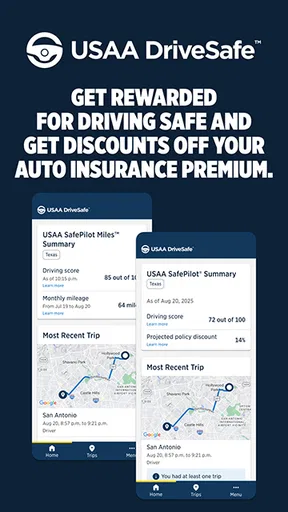
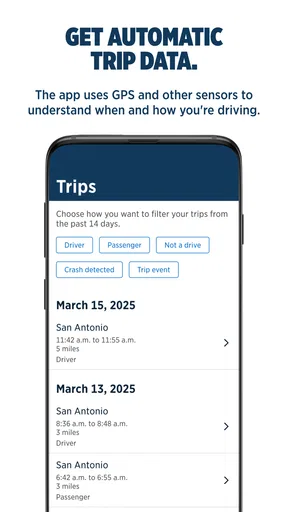
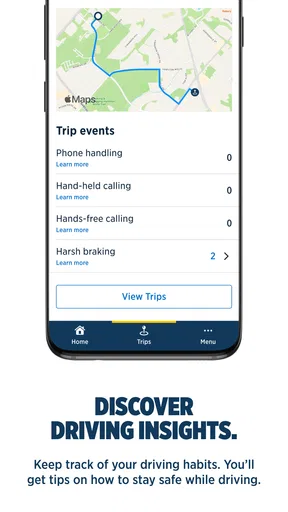
What really caught my attention are the detailed reports. The app tracks everything from speed to harsh braking and even phone usage while driving. Each trip gets a score, and trust me, seeing those numbers can be a real wake-up call. It's like getting a report card for your driving skills!
The useful part is not treating that score as a verdict on whether someone is a “good” or “bad” driver. I would use it as a prompt to review a particular journey: Was I braking sharply because I was following too closely, or because traffic stopped suddenly? Was I checking my phone at a red light, or did I leave it alone for the entire trip? A single score cannot explain the circumstances, but the trip details can help me ask better questions about my habits.
For a fair comparison, I would look at several ordinary drives rather than judging myself from one unusual commute. A sudden detour, a crowded car park, or stop-and-go traffic can make a trip feel unlike a typical day. Checking reports after similar journeys—such as the same commute on different days—can make recurring patterns easier to spot without overreacting to one awkward drive.
Worth Reading Before You Choose

EA SPORTS FC Mobile 26 Is a Bigger Football Game, but It Takes Time

Flipboard Shows What News Apps Must Do Beyond the Feed

Switching to Android Auto Means Rethinking Your Driving Routine

Google Calendar Makes a Crowded Week Easier to Manage

Ludo King Makes the Most of the Minutes Between Plans

Baby Panda World Brings Quick Play to Modern Phones, but Its Game Library Feels Busy
How to make tracking useful rather than distracting
And let's not forget the gamification aspect. With each drive, you earn badges and achieve milestones. It's a fun way to stay motivated, especially if you're competitive like me. Who knew safe driving could be this rewarding?
I’d treat badges as a light nudge, not as a reason to chase a perfect score. The safest use is to set things up before driving, then review feedback once parked. Any system that observes trips is most helpful when it encourages calmer choices, not when a driver is tempted to glance at a phone to see how a journey is going. If you share a car, it is also sensible to make sure everyone who uses it understands that the app may record trip behavior when it is active.
A practical routine is to check a report at the end of the day, pick one behavior to work on, and leave the rest alone for now. If harsh braking stands out, I might focus on leaving more space in traffic for the next few drives. If phone use is the concern, I can put the phone out of reach before starting the engine. Small, repeatable adjustments are more realistic than trying to correct every score category at once.
A realistic day behind the wheel
Picture a weekday with a familiar drive to work, a quick stop at a shop, and a slower trip home through traffic. The morning journey gives me a useful baseline; the shopping stop introduces unfamiliar turns and parking; the evening drive may involve more sudden braking because the road is busy. I would not compare those trips as if they were identical. Instead, I’d use the reports to see whether a behavior keeps appearing across different conditions.
That is where a driving-feedback app can be more useful than relying on memory. Most people remember the stressful moment—the car that cut in, the light that changed—but may forget how often they accelerate hard or reach for a phone on routine trips. Looking back can bring those small habits into focus. The trade-off is that context still matters: a report can flag an event, but the driver has to decide what happened and whether there is a safer response next time.
Does It Make a Difference?
Now, you might be wondering, "Does this app really improve driving habits?" From my experience, the answer is a resounding yes. The app gently nudges you to be more mindful on the road. It's like having a friendly reminder to ease off the gas pedal or to avoid distractions.
That benefit is most believable when I treat the app as a feedback loop: drive normally, review the trip while parked, choose one sensible adjustment, and see whether it becomes a habit. It is not a substitute for driver training, attentive judgment, or following local road rules. Nor should a score encourage risky behavior, such as slowing abruptly or changing lanes simply to improve a metric. Safe decisions have to come first, even when the app’s feedback seems to point in another direction.
Compared with a navigation app, DriveSafe is aimed at reflection after a trip rather than real-time route guidance. Compared with a vehicle’s built-in efficiency or safety display, it offers a phone-based view of driving behavior, while the car’s own systems may be better suited to immediate vehicle information. Drivers who only want directions or maintenance reminders will likely get more value from those usual alternatives. I see DriveSafe as a complement for people who want to examine their own driving, not as an all-purpose motoring app.
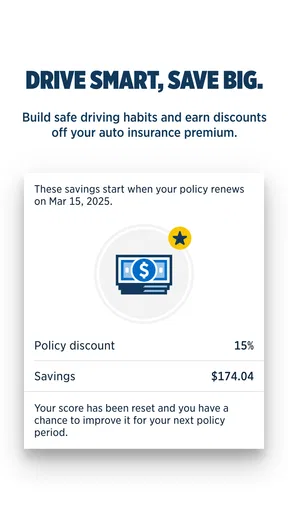
Plus, if you're part of the USAA family, you might even snag some insurance discounts. It's like getting a pat on the back plus a little extra in your wallet. Who doesn't love that?
I would not make a decision based on a possible discount alone. The app’s short store summary notes that it is available in select states, so the practical first step is to check whether it is available to you and whether any insurance-related benefit applies to your situation. A discount should be treated as a potential extra, not a guaranteed outcome or a reason to ignore whether the tracking experience suits your comfort level.
Where it fits—and where it doesn’t
Overall, using USAA DriveSafe has been a game changer for me. It's not just about tracking stats; it's about cultivating better habits behind the wheel. Whether you're a seasoned driver or just starting out, this app offers valuable insights that could make all the difference.
I think it is best suited to drivers who already make regular trips and are curious about their patterns, especially someone trying to become more consistent about braking gently or leaving the phone alone. A parent helping a newer driver reflect on everyday routines may also find trip summaries a useful conversation starter, provided they discuss the context rather than treating a score as the whole story. The app is less compelling for someone who rarely drives, dislikes phone-based tracking, or wants immediate navigation and alerts instead of after-the-fact feedback.
There is also a practical trade-off in relying on Bluetooth and a phone-based workflow: a driver needs to be comfortable with setup and remember that the app is meant to support the journey, not demand attention during it. The current version is 3.16.0.134836, but the version number by itself does not change the core decision: whether you want this kind of driving feedback, and whether it is available in your state.
Final Thoughts
So, if you're ready to take your driving skills up a notch, give USAA DriveSafe a try. You might be surprised at the progress you make—and the badges you collect along the way!
My recommendation is to try it if you are a USAA-connected driver in an eligible state who wants a clearer picture of everyday habits and is willing to review trips after parking. Keep expectations grounded: it is a coach-like aid, not a guarantee of safer driving or a replacement for attention and judgment. If you want route planning, vehicle diagnostics, or a tool that works without reviewing tracked trips, another app or your car’s built-in features may suit you better. For the right driver, though, the simple act of noticing one recurring habit can make the next drive a little more deliberate.
Pros
- Easy-to-use interface enhances user experience.
- Real-time feedback promotes safer driving.
- Customizable alerts for various driving behaviors.
- Integration with car diagnostics for detailed reports.
- Gamification elements make driving improvement fun.
Cons
- Requires consistent GPS signal for accuracy.
- Can drain battery faster due to constant tracking.
- Limited features in offline mode.
- Some features may not work on older devices.
- Subscription required for premium features.
FAQs for USAA DriveSafe
What is USAA DriveSafe and how does it work?
USAA DriveSafe is a mobile app designed to help users improve their driving habits and ensure road safety. It works by monitoring driving behavior through your smartphone's sensors, providing real-time feedback and scoring on various aspects like speed, braking, and phone usage while driving. This data helps drivers become more aware and improve over time.
Is USAA DriveSafe compatible with all smartphones?
USAA DriveSafe is compatible with most Android and iOS devices. However, it requires certain hardware specifications, like a GPS and accelerometer, to effectively track driving behavior. Ensure your device meets these specifications by checking the app's requirements on the Google Play Store or Apple App Store before downloading.
Does using USAA DriveSafe affect my insurance premiums?
Yes, using USAA DriveSafe can potentially impact your insurance premiums. The app provides feedback and scores based on your driving habits, and safer driving can lead to discounts on your insurance rates. However, this varies by state and individual policy, so it's best to consult with USAA directly for specific details.
How does USAA DriveSafe ensure my data privacy?
USAA DriveSafe takes data privacy seriously and complies with all relevant regulations. The app uses encryption to protect your data and only collects information necessary for analyzing driving habits. Users have control over their data and can manage their privacy settings within the app to ensure their information is secure.
Can I use USAA DriveSafe for multiple drivers in my household?
Yes, USAA DriveSafe can be used by multiple drivers within the same household. Each driver needs to install the app on their smartphone and create individual profiles. This allows the app to track and provide personalized feedback for each driver, ensuring everyone benefits from improved driving safety and potential insurance discounts.


